 |
To view the Activity Log from the video
device window, just press the activity log button. You can also access the Activity Log from the system tray menu. |
|
|
To view the Activity Log from the video
device window, just press the activity log button. You can also access the Activity Log from the system tray menu. |
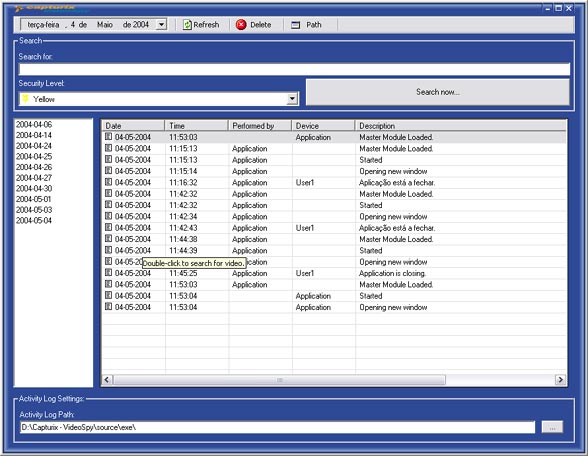
Activity Log
The activity log is a feature that records all Capturix VideoSpy activity, user interaction, system events, I/O states, and many more.
To see the activity log of any date just select the date on the top left menu and you will see the activity log.
Activity Log Settings
You can change the acitivity log settings on Capturix VideoSpy master settings window (see Aplication Settings)
Event Level
All actions are classified with a numeric value 0-5 this helps you to see what was the most important events
See images by event
If you want to see images from a related event (Motion detector from a camera) just double-click the item if there is any image recorded you will get a Media Viewer with this images.
Refresh
This will refresh the entries on Activity Log
Delete
Ables you to delete the activity log files from the disk
Path
Ables you to select the location of the activity log files.
© Capturix Software Technologies. All rights reserved.