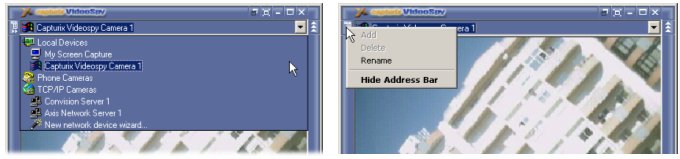
Address Bar
This address bar is where all video capture devices are stored, there is 3 types of video capture devices:
Local Devices - This are devices directly connected to your computer, such as Webcams, video capture cards, tv tuners, etc.
Screen Capture driver will be listed and is a part of Capturix Video Capture Engine, this allows you to have screen display as a video source. Very useful if you want to record your computer activity.
Phone Cameras - This is a support for phone line video capture devices (this will be available soon, there is no comercial devices available for this feature).
TCP/IP Cameras - This are devices based on network TCP/IP protocol, there is many products available (eg. ISALabs, Axis, Convision, Panasonic, many others).
Entering a address
You can enter a network address directly on the address bar like Internet Explorer, when you want to connect just press <ENTER>
Add Device to address bar
1. Enter the address on the address bar and press <ENTER>
2. Click on the left button of the address bar, you will see a bookmark menu (see the picture)
3. Select ADD
This device is now on Address List
Remove device from address list
1. Select the address you want to remove
2. Click on the left button of the address bar, you will see a bookmark menu (see the picture)
3. Select Remove
This device is now removed from the address list
Rename a device
Atention: The device must be added in the address list
1. Select the address you want to rename
2. Click on the left button of the address bar, you will see a bookmark menu (see the picture)
3. Select Rename
4. Choose a new name for this device and press OK
This device is now renamed
Hide Address bar
This option will do the same as the right button.
New network device wizard...
This wizard helps you to enter a new url for known network devices.
© Capturix Software Technologies. All rights reserved.