 |
To access each device configuration you need to
activate a device opening a video window and press the Media Viewer Button. You can also access the Media Viewer from the System Tray Menu >> Media Archive. |
|
|
To access each device configuration you need to
activate a device opening a video window and press the Media Viewer Button. You can also access the Media Viewer from the System Tray Menu >> Media Archive. |
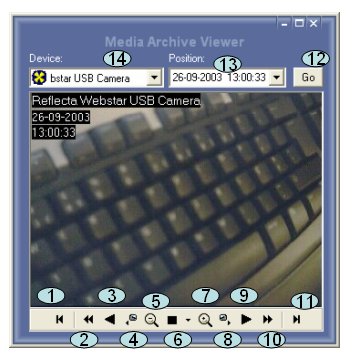
Device Selection (14)
Atention: The device must be added to the address list see Video Window how to add the address.
Select the device that you want to see the archive.
Select from the list (14)
Player Controls
1. Go back (the oldest saved image)
2. Fast Rew Play (play at maximum speed)
3. Rew Play (from the newest to the oldest image)
4. Go back one frame (frame by frame)
5. Digital 22x Zoom Out (Enterprise Edition Only)
6. Stop and special functions:
7. Digital 22x Zoom In (Enterprise Edition Only)
8. Go forward on frame (frame by frame)
9. Play
10. Fast Forward Play (play at maximum speed)
11. Go to the newest saved image
12. Device selection
13. Date search (See also: Search by date)
Audio Player
See Audio Player page.
© Capturix Software Technologies. All rights reserved.