 |
To access each device configuration you need to
activate a device opening a video window and press the Media Viewer Button. You can also access the Media Viewer from the System Tray Menu >> Media Archive. |
|
|
To access each device configuration you need to
activate a device opening a video window and press the Media Viewer Button. You can also access the Media Viewer from the System Tray Menu >> Media Archive. |
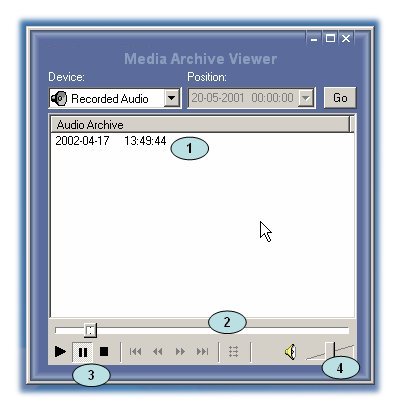
Recorded Audio
In the device menu you can find recorded audio item, this will list all audio tracks recorded on the local machine, in the list (1) there is a file recorded at 2002-04-17 13:49:44.
Select the device that you want to see the archive.
Listening audio
1. Just select the file by clicking over the item (1)
2. Press Play icon (3)
Then you have the normal controls of any audio player, Play, Pause and Stop.
Audio Volume
You can adjust the audio volume in the volume control (4)
© Capturix Software Technologies. All rights reserved.