 |
To access Remote Administration settings, just go to System Tray and click VideoSpy icon. |
|
|
To access Remote Administration settings, just go to System Tray and click VideoSpy icon. |
Routers/Firewalls
Capturix VideoSpy have a internal web server that ables user to access the video surveillance system from any browser in any part of the world.
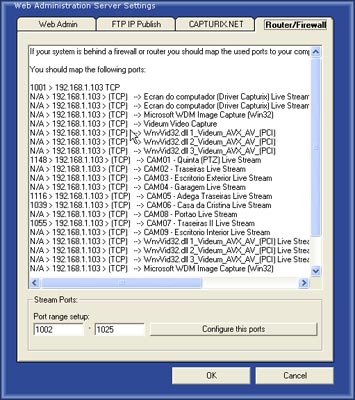
If you are behind a router or a firewall you should configure this devices to allow the incoming/outcoming packets to this computer.
To help you configure the stream ports (Live transmission ports used by the software) you can access the list that you need to map on the router or firewall.
You can also setup a Port Range to be more simple to map all the ports.
.© Capturix Software Technologies. All rights reserved.