| To access Video Clip Maker you must go to Main Menu by clicking on the tray icon and press Video Clip Maker |
Video Clip Maker
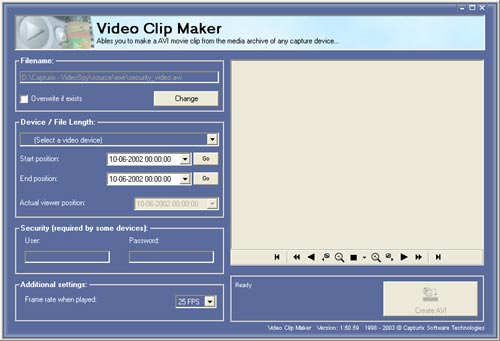
This feature ables you to create a AVI from the surveillance archive, this can be played on other computers without VideoSpy installed.
Map
1. Filename location - Where will be stored this AVI file
2. Overwrite if exists - Check if you want to delete the old file if exists with the same name of the AVI file
3. Camera Selector - Select the device you want to use
4. Time archive controls - Select the Start position (first image of the AVI) and End position (last AVI image)
5. Security Username & Password - To be used on Network devices only (eg: Network Video Servers)
6. Frame rate when played - Frame rate that player will play this file
example:
If you have recorded the security video at 1 FPS and if you select 25 FPS on Video Clip Maker, the AVI player (like Windows Media) will play 25 seconds of video in 1 second or 250 images in 10 seconds.
7. Viewer Controls - Helps you to get the avi positions see also Archive Viewer
8. Build AVI
Build AVI
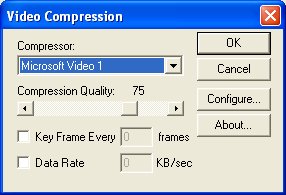
This will appear after you press Build AVI button, now you can choose the compressor you want to use, after you press OK the application will begin creating the file.
© Capturix Software Technologies. All rights reserved.