- Video Maximize, ables you to expand video for all window size.
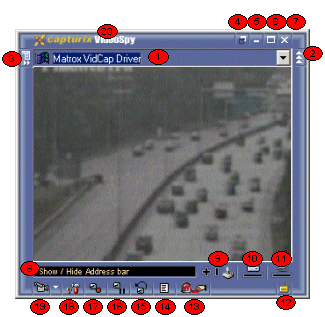
1. - Address Bar, Device List and Bookmars.
This list box displays all physical devices and allows user to access the network/phone cameras.
2. - Address Lock button, this button hides the address bar, use this button when you are using more than one video window with fixed devices.
3. - Bookmark button, this will show a menu with some options.
Add - Add to favorite devices
Delete - Delete this address from the favorite devices
Rename - Rename the device description
Hide Address Bar - Hide the address bar, the same of Address bar Lock button (2)
4. - Always on top button / Not always on top button, to keep the window always on top.
5. - Minimize
6. - Maximize
7. - Close this window, if there is only one window this will terminate the application.
8. - Status Bar, all application status.
9. - Joystick Position, this will show the joystick position in realtime, is useful for camera control.
10. - Store Graphic, this will show how disk available is.
11. - Motion Graphic, this will show the motion detector status.
12. - Lock Device, this will lock all settings of the window, this is useful for devices configured by a administrator. (discontinued)
13. - Alert button, this buttons allows user to activate instant alerts or external hardware.
14. - Activity Log viewer
15. - Viewer. this is used to see video previous recorded by the application.
16. - Freeze and capture one image.
There is Save and Print button
If you press +/- you can make digital zoom to this image
17. - Record button indicator
18. - Video Device Settings, this will configure the Recording schedule, Motion Detection, Image Settings, FTP Upload, etc.
19. - Video Device Driver Settings, this is a dynamic menu and can be different between devices, this will adjust all video settings for the selected device.
20. - Window title, this can show software name or device description.